Custom Buttons Guide
Add buttons of your own, with your own icons, to the button row of the Basic Info window, under the HP and SP bars, on a 2025-07-16 Ragnarok Online client, using the Custom Buttons WARP patch.
12732 x 34 24-bit BMP, magenta FF00FF transparent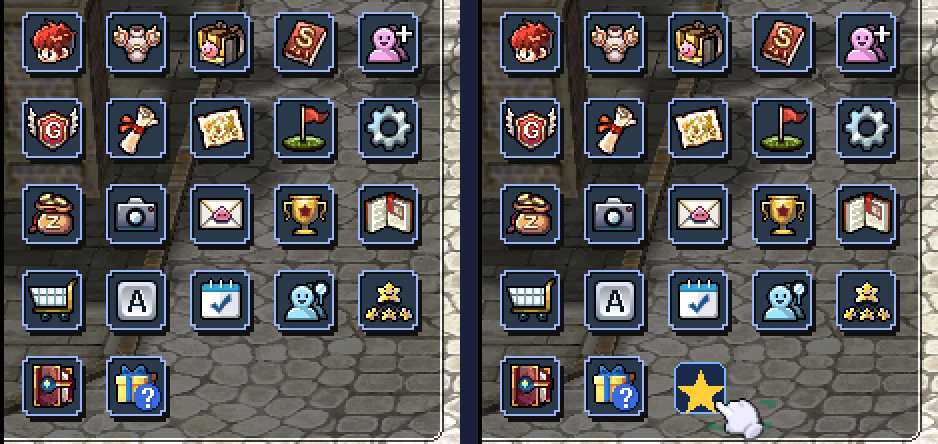
Point at a button to see the file it loads.
1 Write the list
Tick Custom Buttons → Add your own buttons in WARP and type one button per line.
donate = Options
guide  = WorldMap
The left side is the button's name. The right side names one of the client's own buttons, from the list in step 3, and yours will do whatever that one does. Nothing else to fill in.
donate and the client will go looking for bt_donate.bmp. That is the whole link between the list and the artwork, which is why step 2 matters.
What a name can be
| Characters | Letters, digits and _ |
|---|---|
| Length | 1 to 15 |
| Repeats | Each name once. A duplicate is refused by name. |
| Case | A duplicate is matched without case, so donate and Donate count as the same name. |
| Layout | Blank lines are skipped, a line starting with # is a comment, and a ; ends an entry the way a new line does. |
The whole list is checked before anything is written, so a typo stops the patch with a message instead of leaving you a half-built client.
2 Draw the icons
Two bitmaps per button. Both live beside the client's own icons.
data\texture\<UI folder>\menu_icon\bt_donate.bmp        resting and hover
data\texture\<UI folder>\menu_icon\bt_donate_press.bmp  held down
<UI folder> is the client's interface folder, 유저인터페이스, which Windows shows as À¯ÀúÀÎÅÍÆäÀ̽º because the name is CP949 bytes. Loose files there override the GRF, so drop your bitmaps in to test and pack them into a GRF later. Either way works.
| Property | Value | Why |
|---|---|---|
| Size | 32 x 34 pixels | Matches the stock icons. |
| Format | 24-bit .bmp | Not PNG. The client only reads BMP here. |
| Transparency | FF00FF magenta | There is no alpha channel. Magenta is the see-through colour. |
Note: Fill every transparent pixel with pure magenta. Not near-magenta. FE00FE will show up in game as a bright pink fringe around your icon.
Press Show the magenta in the grid above to see what the files look like before the client knocks that colour out.
3 Pick what it does
These are the stock buttons a custom one can borrow from. Write the one you want on the right of the equals sign.
Stats Equipment Inventory Skill Party Guild Quest WorldMap Navigation Options Bank Record Mail Achievement Tip Shop Shortcut Attendance AdventureAgency Reputation AdventureGuide Probability
Case does not matter, so options and Options both work. Anything not on this list is refused, and the message lists what is available. The client's list holds 25 buttons and draws 22: Battleground, Booking and Twitter are hidden on this client, and they are not on this list.
4 Check it
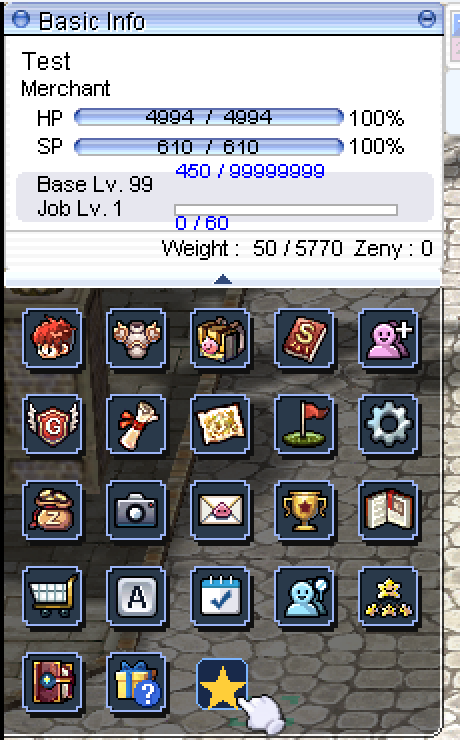
Apply the patch, launch the client and open the Basic Info window. Your button sits at the end of the row, after the client's own, and clicking it does whatever the stock button you named does.
WARP's log prints one line per custom button as it bakes the list in, naming the bt_ file the client will look for and the stock button it acts as. Read it before you launch and the pairing is settled on the spot.
Troubleshooting
Four things account for nearly every report.
bt_ file the client will look for and the stock button it acts as. If those lines are not in the log, check SkippedPatches.log and the .epi beside your patched exe for CustomButtons.bt_ plus exactly the name you typed, that it sits in menu_icon\ and not the folder above it, and that it really is a .bmp rather than a PNG that has been renamed.FF00FF. An editor anti-aliased the artwork against the magenta, or saved with a slightly shifted palette.Worth knowing
| Question | Answer |
|---|---|
| How many can I add? | Up to 127 buttons in total, including the client's own. The row wraps every 5 and the panel grows to fit. |
| Does it change the stock buttons? | No. They are copied across exactly as the client built them, including anything other patches did to them. |
| Do they have tooltips? | Not yet. A custom button shows no label on hover. |
| What if I remove the patch? | The row goes back to the client's own list. Nothing is left behind. |