Custom Hairstyles Guide
Twenty-three hairstyles. The client has forty-five. Character creation stops at 23 because the picker is one fixed grid of 24 cells. Your data.grf already holds sprites and palettes for 45. This page turns all of them on, then shows you how to add your own.
data.grf that holds kRO's 45 hair sprites and palettes- kRO ships 45 hair sprites but only 23 picker thumbnails. That gap is the whole problem.
- The missing thumbnails ship with this WARP release: 22 styles, male and female, 44 files. You do not have to make them.
- Two WARP patches and one server setting turn all 45 on. About ten minutes.
Which job are you doing?
The two are separate, and the first one is much shorter. Most people only need it.
data\ tree rather than typing them.
1 Copy in the missing thumbnails
A style with no thumbnail draws as a blank square. It still works when clicked, it just looks broken.
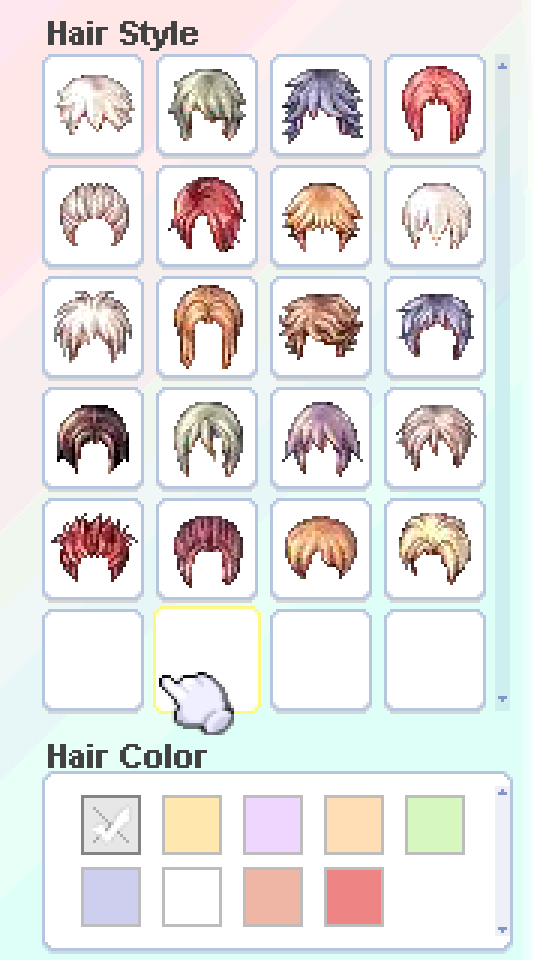
This release ships the 44 files kRO leaves out, 22 male and 22 female, generated from kRO's own sprites:
Merge it with the data folder already there. That is the whole step. The Korean folder names inside are already correct on disk, so you never have to type them.
data\texture\À¯ÀúÀÎÅÍÆäÀ̽º\make_character_ver2\ instead. Loose files and GRF entries work equally well; loose is just less work.
2 Patch the client
In WARP, tick these and patch the exe your players actually run. The first two are both required: one makes a style choosable, the other makes it wearable. The third is optional and keeps a palette you forgot from taking the client down.
| Patch | What to enter | What it does |
|---|---|---|
Allow 65k Hair Styles |
Hair Style Limit: 45 | Lets the client build sprite and palette filenames from the number itself instead of a 43-entry lookup table. Styles above your limit fall back to style 1 instead of leaving the character headless. |
Increase char create Hair limits (Reforged) |
New Char Limits: 45 one field, default 45 |
Turns the grid's last cell into a next page button and raises the limit that decides which cells are allowed to draw. |
Hair colour guard, and extra hair coloursoptional, recommended |
Hair Colours: 9, the client default | Checks a hair colour's .pal exists before the client loads it, and ignores the colour if it does not. Without it a single missing palette crashes the game, which is covered below. |
Increase char create Hair limits (Reforged) asks Copy Hair Thumbnails, then Thumbnail Target. Yes writes the same 44 files as step 1 into the folder you pick, under data\texture\...\make_character_ver2. Point it at your client folder and step 1 is done for you. The default puts them beside the patched exe, so you move them across with it. If you already did step 1, answer no.
Increase char create Hair limits (Reforged) does not touch them, so this dialog has no colour field. To offer more than nine, apply Hair colour guard, and extra hair colours and set its colour count: it pages the swatch row the same way this patch pages the style grid. The full recipe is in the Custom Hair Colours guide. Older WARP builds showed a Hair Color Limit field here; it was read by nothing and has been removed. A profile that still carries the old value keeps working, and the style limit is taken from it.
3 Let the server accept them
The client can now ask for style 40. The server still has to allow it.
max_hair_style: 45Set it to at least your highest style. Without this the character is created with a clamped or default hairstyle and the player's choice is quietly discarded.
Now check it end to end
Create a character, page to the second page, pick something past 23, then log in and confirm the hair matches the thumbnail you clicked. Creation and rendering are separate paths and can fail independently, so checking only one proves half of it.
What one hairstyle costs you
Everything comes in pairs, because male and female are separate assets all the way down. Each file fails differently when it is missing, which is useful to know before you start.
| File | What it is | Missing it means |
|---|---|---|
<N>_³².spr + .act | male hair worn in game | “File not found” popup, character goes headless |
<N>_¿©.spr + .act | female hair worn in game | the same |
¸Ó¸®<N>_³²_<C>.pal | one per style, gender and colour | the client crashes when a player picks that colour, unless Hair colour guard, and extra hair colours is applied |
img_hairstyle<NN>.bmp | male thumbnail, 36 × 37, 24-bit | blank cell, but it still selects and still works |
img_hairstyle_girl<NN>.bmp | female thumbnail, same format | the same |
Sprite and palette numbers are written plainly (46_³².spr, ¸Ó¸®46_³²_0.pal). Thumbnail numbers are zero-padded to two digits, so a single-digit style would be img_hairstyle07.bmp. Getting that padding wrong is the most common reason a cell renders blank.
Trap: Missing palettes crash the client.
Ship a palette for every style and every colour you offer, or players will crash the game just by clicking around character creation. This is not a cosmetic gap. Tested on 2026-08-14: pick a style whose palettes are missing, click any hair colour, and the client shows CPaletteRes :: Cannot find File. Press OK and it dies immediately with Exception Type: 0xc0000005, an access violation, and the Gravity error handler offering only Exit.
The reason is in the client: its sprite recolour loop reads palette[index] with no null check, so a palette that failed to load is dereferenced anyway. The client cannot recover from that on its own, and no arrangement of your data files talks it out of it.
Nine colours means nine .pal files per style per gender. For a pack that adds fifty styles for both genders that is 900 files. Plan for it before you commit to the style count, because a half-supplied set is worse than a smaller one.
There is a patch for this
Tick Hair colour guard, and extra hair colours in WARP and the client tests for the .pal before loading it, looking in your GRF as well as in loose data\ files. When the file is missing the colour is quietly ignored: no error box, no crash, the player keeps going. Treat it as a net rather than a substitute for shipping the files, because a guarded style still has no colours to offer. It also guards the other way round, when a player already has a colour selected and then picks a style that has no palettes.
4 Put the files where the client looks
Loose files in data\ are read directly. You do not need to repack a GRF.
Trap: Read this before you create a single folder.
Do not type the Korean folder names. On a Western Windows install the folders in data\ are not named 인간족 or 머리통. They are named with the raw CP949 bytes, which your system codepage renders as Latin-1 mojibake, and that mojibake is the real name.
A GRF stores names as raw bytes and matches them inside the archive with Windows uninvolved. A loose file goes through CreateFileA, so Windows maps those same bytes with the system ANSI codepage. Type real Korean and you create a folder the client never asks for. It does not error. It silently falls back to data.grf and your hairstyles simply do not exist.
So: extract the folders from data.grf with a GRF tool, or copy an existing data\ tree. Both write the correct bytes. Typing the names by hand is the one approach that reliably fails.
| Folder | Shows as (codepage 1252) | CP949 bytes |
|---|---|---|
| race root | Àΰ£Á· | C0 CE B0 A3 C1 B7 |
| hair | ¸Ó¸®Åë | B8 D3 B8 AE C5 EB |
| male | ³² | B3 B2 |
| female | ¿© | BF A9 |
| UI textures | À¯ÀúÀÎÅÍÆäÀ̽º | C0 AF C0 FA C0 CE C5 CD C6 E4 C0 CC BD BA |
Which gives these full paths:
data\sprite\ in Explorer. If you see Àΰ£Á·, that is correct and your box is codepage 1252. If you see 인간족, you are on a Korean-locale machine and your names are already right for it. The bytes are what matter, not what they look like.
5 Make the thumbnails
Drop your sprites and palettes below and the thumbnails come back out. Everything happens in your browser; nothing is uploaded.
.pal files in with the sprites. If a style has none, that tile keeps its face and is marked no palettes, so a fallback never passes silently for a choice.
Drop hair .spr and .pal files here, or click to choose them.
Everything happens in your browser. Nothing is uploaded.
Names come from the sprite's own filename, so 46_³².spr becomes img_hairstyle46.bmp and 46_¿©.spr becomes img_hairstyle_girl46.bmp. Each file is 36 × 37, 24-bit, with magenta FF00FF as the transparent colour, which is what the picker expects. If a head looks turned away, raise Frame until it faces front and regenerate. Art bigger than 36 × 37 is clipped, not scaled, so a very long style loses its ends. Crop it first if that matters.
Trap: Generate 24 and up, never 1 to 12.
kRO's picker order is shuffled for the low styles, so cell N there does not show sprite N. Cell 1 shows sprite 2, cell 3 shows sprite 7, and so on. Regenerating those and overwriting kRO's files would put the wrong art in them.
There is no reason to: kRO already ships correct thumbnails for 1..23, and this release ships 24..45. Start at 46, where the numbering is straightforward. If you compare a generated 1 to 12 against kRO's and it looks wrong, that is this, not a fault in your set.
Measured on 2026-08-14 by matching each kRO thumbnail to the sprite it was cut from. Male: 1→2, 2→1, 3→7, 4→5, 5→4, 6→3, 7→6, then 8 up are the same number. Female: 1→2, 2→4, 3→7, 4→1, 6→3, 7→6, 8→12, 9→10, 10→9, 12→8, then 13 up are the same number.
13..23 through the generator and compare with the thumbnails kRO ships for those numbers. They will not be byte identical, since kRO's were drawn and these are photographed, but each should clearly be the same hairstyle. If they are not, your frame number is wrong and the rest of the set will be too.
6 Raise the limits again
Three separate numbers decide what a player can reach. They all have to clear your highest style.
| Limit | Where | Ceiling |
|---|---|---|
| Styles offered in creation | WARP, Increase char create Hair limits | 128 |
| Highest style the client will load | WARP, Allow 65k Hair Styles | 65535 |
max_hair_style | conf/import/battle_conf.txt | n/a |
Allow 65k Hair Styles will not take a number below 43, the size of the client's hair name table. Increase char create Hair limits (Reforged) cancels at 23 or less, because the stock grid already offers 23 and there would be nothing to page.
@hstyle and item scripts still reach further.
The way the picker pages
The page size is fixed at 23 and your limit rarely divides by it, so decide your number here rather than after you have cut the art.
Warning: A style with no thumbnail draws as an empty cell.
The picker draws from the bitmaps, not from the sprites. A hairstyle whose sprite is present but whose img_hairstyle<NN>.bmp is missing still holds its cell and still selects: the cell just draws blank. It is not an error and nothing in the log mentions it, so a player cannot tell it from a dead cell.
kRO ships sprites and palettes for styles 1 to 45 but picker thumbnails for 1 to 23 only, which is why 24 to 45 need the thumbnail pack even though their art is already in the GRF. Check every style you add has both.
The grid is 24 buttons, four columns by six rows. The first 23 are hairstyles and the 24th is the page button, so each page holds 23. That cell draws img_hairstyle99.bmp and img_hairstyle_girl99.bmp if you supply them, which is where the > arrow goes. This release does not ship them and they are not in the thumbnail pack, so by default the cell is empty: it still pages, it just gives the player nothing to aim at. Make the pair yourself at the same 36 × 37, 24-bit, magenta FF00FF format as any other thumbnail, or leave them out and accept an empty pager cell. Above 98 styles the arrow is dropped, because the pager needs an index the draw limit will not touch. The style under a cell is page × 23 + cell, counting the first page as zero.
| Page | Styles |
|---|---|
| 1 | 1 - 23 |
| 2 | 24 - 46 |
| 3 | 47 - 69 |
| 4 | 70 - 92 |
| 5 | 93 - 115 |
| 6 | 116 - 128 |
Troubleshooting
data.grf instead.Increase char create Hair limits is not applied, or its style count is still 23.img_hairstyle07.bmp.Increase char create Hair limits is set lower than that style, so the picker refuses to draw the cell while the click still works..spr/.act pair is missing or misnamed. The picker and the worn sprite are different files..spr and .act at the paths in step 4.Allow 65k Hair Styles is not applied, so the loader never learned to build the filename from the number. The picker was patched, the loader was not.Allow 65k Hair Styles from before the Part 2 update read one entry past the end of the client's 43-entry hair table.Allow 65k Hair Styles is applied but its limit is below that style, so the loader clamped it to style 1.max_hair_style is below that number, so the server clamped it.conf/import/battle_conf.txt (step 3)..pal..pal, and tick Hair colour guard, and extra hair colours so any gap you miss is ignored rather than fatal..pal files for that style so hair could not be told from skin.Checklist
Check off items as you complete them. Progress is saved in your browser.
Before you ship
- Thumbnails in place for every style you offer, zero-padded, male and female
img_hairstyle99.bmpandimg_hairstyle_girl99.bmpif you want an arrow on the pager cell rather than an empty one- Male and female
.sprand.actfor anything past 45 - Palettes for every style and every colour you offer, with none missing, because an unguarded gap crashes the client
- Both limit patches applied to the exe players actually run, plus
Hair colour guard, and extra hair coloursif you want the crash netted - The two limits set to your highest style, and equal to each other
max_hair_styleraised on the server- One character created from the last page, logged in, hair matches the thumbnail